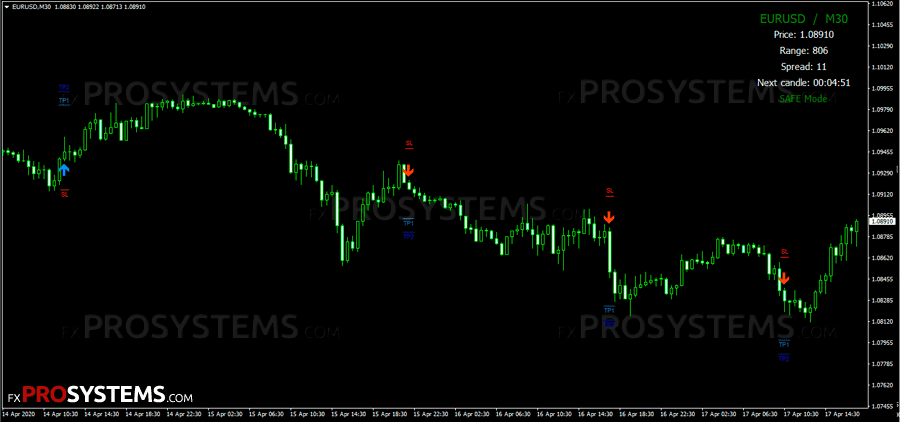
Smart Analyzer PRO - remove market noise and generate an accurate signal

Smart Analyzer PRO is a manual trading system based on Price Action without repainting, for different trading styles (scalping, day trading, swing trading), different currency pairs, metals, indices, with a three-level alert system and easy mastering even by beginners. And also, according to the seller, it is very profitable.
Characteristics of the Smart Analyzer PRO System
- Platform: Metatrader4
- Currency pairs: Any currency pairs, metals, indices
- Trading Time: Any trading sessions, recommended London and New York
- Time Frame: M1-D1
- Recommended broker: VT Markets | XM | Roboforex
Indicators of the system
Smart Analyzer PRO consists of 2 main indicators (signal and filter) and 3 auxiliary indicators (currency and timeframe change indicator, candlestick display indicator and background indicator):
- Smart E - main signal indicator (Arrows + alerts)
- SmartMTF - multitimeframe filter with display of the current trend direction on higher timeframes
- Symbol Changer profit display v5 - trading assistant that will help you to quickly switch between different pairs and not only (you can set any trading asset in the settings), and different TFs
- Smart Candles - this indicator replaces standard candlesticks with wickless, elongated rectangles — essentially an averaging display that smooths out the noise from quick spikes and wicks. It's a similar concept to Renko charts (which also strip out time-based noise to show pure price movement), but with one key difference: unlike Renko, Smart Candles works directly on a normal chart — no offline chart setup required. Whether removing that visual noise actually improves your trading is a separate question, but at least now you know what it's doing.
- SmartBackground - chart background colour

The system has three templates for different trading styles:
- Scalping - for M1, M5, M15
- Daytrading - for intraday trading on M5, M15, M30 and H1
- SwingTrading - for H1, H4 and D1
Moreover, each template (scalping/dailytrading/swingtrading) contains a different set of candlesticks to find the best signals.
Trading rules
BUY signal
We should open a long position when the following 2 conditions are met:
- Blue up arrow + Alert has appeared
- All three candles of the SmartMTF indicator are blue:

SELL signal:
And similarly, we should open a short position when the following 2 conditions are met:
- A red down arrow + Alert has appeared
- And all three candles of the SmartMTF indicator are red:

Set StopLoss at the level of the nearest price minimum/maximum or using support/resistance levels.
TakeProfit should be set at StopLoss * 2 or depending on the TimeFrame based on preliminary tests on history.
Final Conclusions
The Smart Analyzer PRO system can be profitable with the right approach, but it's worth pairing with additional filters from other indicators. It is necessary to test it in trading on a demo account or using a simulator. Of course, do not forget about risks and do not invest money that you cannot afford to lose.
In the archive Smart_Analyzer_PRO.rar (568.0 Kb):
- Smart E1.ex4
- Smart E2.ex4
- Smart E3.ex4
- Smart-Background.ex4
- Smart-Candles.ex4
- SmartMTF-Daytrading.ex4
- SmartMTF-Scalping.ex4
- SmartMTF-Swing.ex4
- Symbol changer profit display v5.ex4
- Smart - Daytrading.tpl
- Smart - Scalping.tpl
- Smart - SwingTrading.tpl
Free Download Smart Analyzer PRO