Quantum Emperor EA — the developer's own worst-case math, and what happens when the clock is wrong by one hour
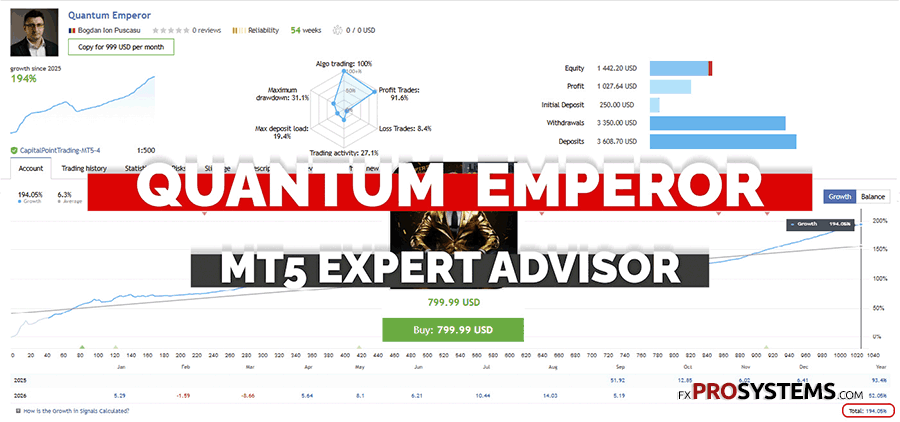
Same developer, same Quantum family, and this time a genuinely unusual find while testing the Quantum Emperor EA: the manual doesn't just describe the recovery mechanism — it publishes the developer's own worst-case loss table for it. I read the full manual, went through the product and live-signal pages, cross-checked independent analysis from outside the vendor's own material, and ran seven backtests of my own, including two designed specifically to break it. One of them did, spectacularly, from a single hour of misconfigured broker time. Here's what I found.
Characteristics of the Quantum Emperor EA MT5 v7.5
- Official page: MQL5
- Platform: Metatrader4 | Metatrader5
- EA version: 5.8 (MT4) + 7.5 (MT5)
- Currency pair: GBPUSD only
- Trading hours: 24/5
- Timeframe: H1
- Minimum deposit: $500 official minimum, $1,000 recommended (tests used $1,000)
- Account type: Hedge, ECN/Raw
- Recommended brokers: Roboforex | VT Markets | IC Markets — GMT+2 (DST) server time assumed by default
- VPS: required for continuous 24/5 operation
- Price: $799.99 (rising $50 every 10 purchases, final price $1,999) and FREE here ↓
How does it work?
Every trade Quantum Emperor EA places is immediately split into 5 smaller orders (the manual calls this “Amount,” default value 5, sometimes described as 6 including the trigger order). Each individual order carries a 250-pip Stop Loss. So far, this reads like a disciplined, risk-defined system.



The part that matters is what happens when a batch of 5 hits that Stop Loss. Instead of closing and accepting the loss, Quantum Emperor opens a new batch of 5 orders — sized at a 1.6x multiplier over the previous batch — and tries to use the winners from that new batch to gradually pay down the losers still sitting open from the first one. This can repeat up to 3 times by default (the “Recovery multiplier times” setting). That's not my characterization — it's a direct description of the mechanism in the developer's own manual, just without the word “martingale” attached to it.
What sets Quantum Emperor EA apart from the rest of the lineup is that the developer publishes his own worst-case math for this mechanism, in the same manual:
| Risk Level | Loss if 7 trades hit SL (no recovery) | Loss if recovery batch also hits SL |
|---|---|---|
| Medium (default) | 5.81% | 13.36% |
| High | 11.66% | 26.81% |
| Very High | 17.50% | 40.25% |
| Extreme | 21.88% | 50.31% |
At the Extreme setting, the developer's own documentation acknowledges a scenario that costs over half the account. That's a genuinely unusual level of transparency for this category of product — most vendors leave you to discover the worst case yourself. It's also, as I'll get to, an optimistic one: my own backtest at Medium risk found real drawdown running roughly double what this table predicts.
One more detail from the manual worth knowing: the developer explicitly recommends touching only two settings — the broker time-zone alignment and the risk level — and leaving everything else, including the recovery multiplier, the 250-pip Stop Loss, and the additional-trade logic, at default. I tested what happens when that time-zone alignment is off by a single hour. It matters more than the manual's tone suggests.
What real users are reporting
Quantum Emperor EA is one of the best-reviewed products in this developer's lineup — 4.85 stars from 584 reviews at the time of writing, with the developer personally replying to nearly every single one. The tone is overwhelmingly positive: multiple long-term users report years of stable use, several specifically praise the recovery mechanism for turning apparent losses back into profit, and more than one reviewer describes not having seen a single losing trade close in months. That last point is worth sitting with for a second — under this architecture, a “trade” isn't really closed until its whole batch resolves, so an account can show a long streak of clean wins on the surface while individual legs sit open and underwater for extended periods in the background.
One shorter review is a useful counterweight: a user reported two Stop Losses in a short window and said he'd “see how it goes for a while.” The developer's reply reframed it plainly — stop losses are a normal, expected part of how the system protects capital, not a malfunction. That's a fair point on its own terms, but it's also a good reminder that “SL hit” here doesn't mean what it means on an EA without a recovery layer: it can be the first domino in the 1.6x/3-batch sequence described above.
Independent analysis from outside the developer's own material tells a more pointed version of the same story. One documented event: in June 2024, Quantum Emperor reportedly suffered a drawdown in the region of 70% on a real account — described elsewhere at the time as one of the worst single-month results among the most popular MQL5 EAs. That's the kind of event a recovery-based grid produces when a market trends in one direction without the pullback the mechanism is built to wait for. Separately, independent analysis of an earlier incarnation of the live signal found roughly $12,000 in deposits flowing into an account that started near $1,000, with a pattern of deposits landing specifically during drawdown periods — the effect being that a headline “300%+” total gain figure looked closer to a 30% deposit-adjusted return once the injected capital was accounted for. I can't independently verify the exact figures in that specific historical episode myself, but the shape of it matches exactly what I found on the current live signal, below.
Testing
I ran seven backtests to understand both how Quantum Emperor behaves on its own recommended settings, and where it breaks.
An honest note on the test window first. Tests 1, 2, 3, and 7 below cover 2008–2026, matching the full history available on GBPUSD. But Quantum Emperor doesn't actually place its first trade until 2015 — the seven years before that pass with no activity at all, despite price data being available. The most likely explanation: the entry logic's thresholds (RSI levels, the swing-high/low lookback, the specific time windows) appear to have been tuned specifically around GBPUSD's post-2015 behavior, and simply don't produce a qualifying signal on the price action from 2008–2014 — possibly because that earlier period didn't suit the strategy as well and was left out of what the settings were calibrated against. Whatever the reason, the real tested window is closer to 11 years than 18. Once I noticed this, I moved the remaining tests (4 through 6) to start from 2015 instead of 2008, so the reported drawdowns and trade counts reflect the period where the EA is actually active rather than padding the headline range with years of silence.
Test 1 — 2008–2026 | GBPUSD | Medium risk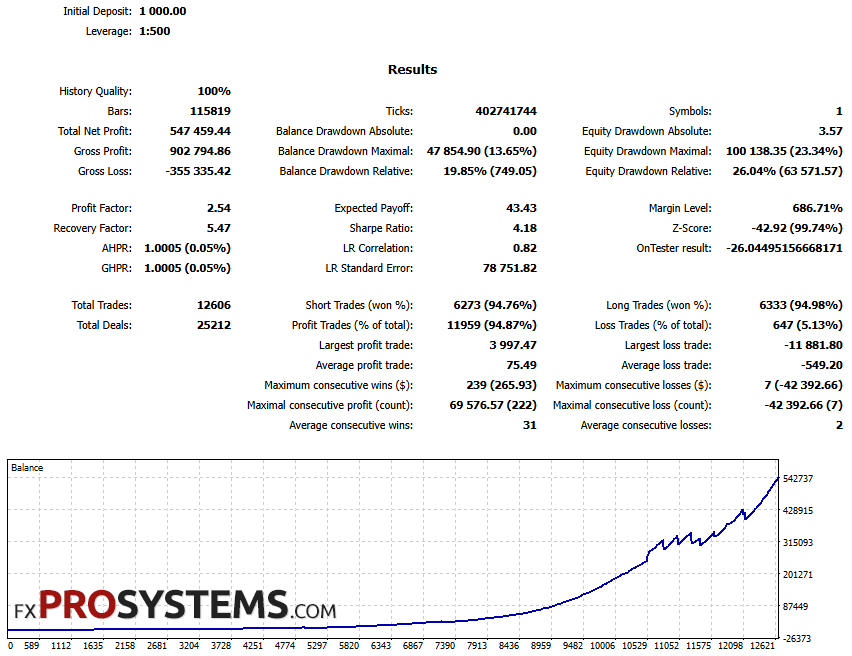
Test 2 — 2008–2026 | GBPUSD | Medium risk | Smart Recovery OFF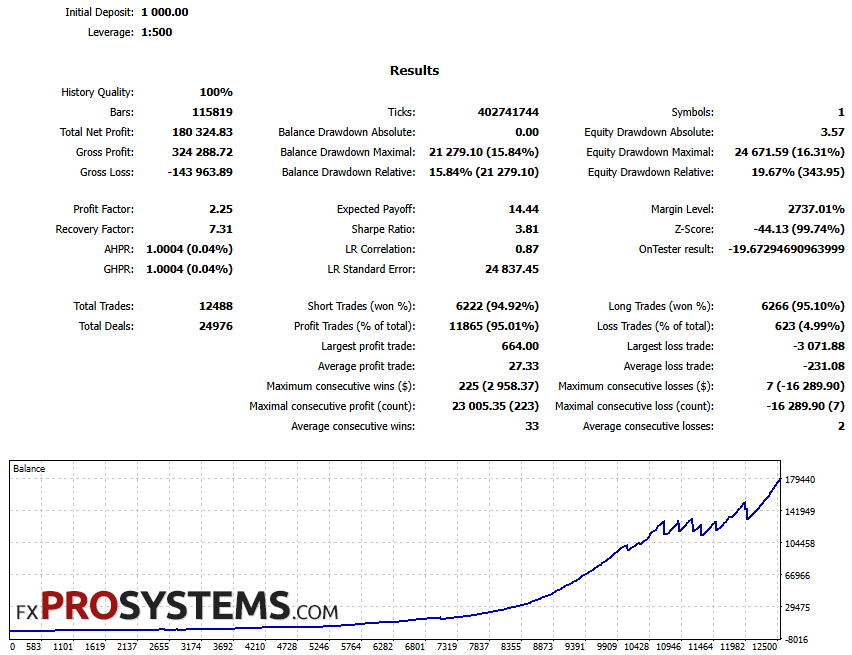
Test 3 — 2008–2026 | GBPUSD | Very Low Risk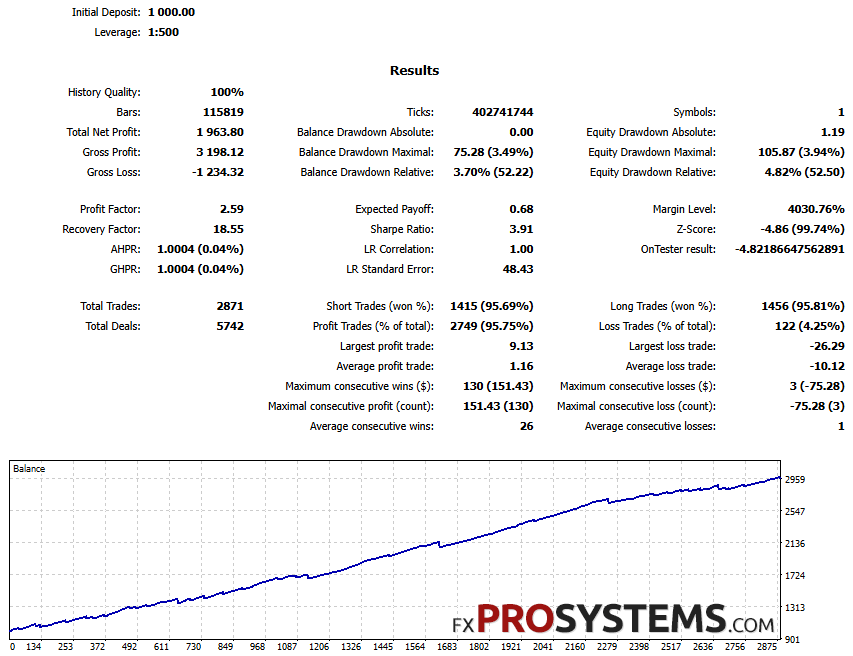
Test 4 — 2015–2026 | GBPUSD | Extreme Risk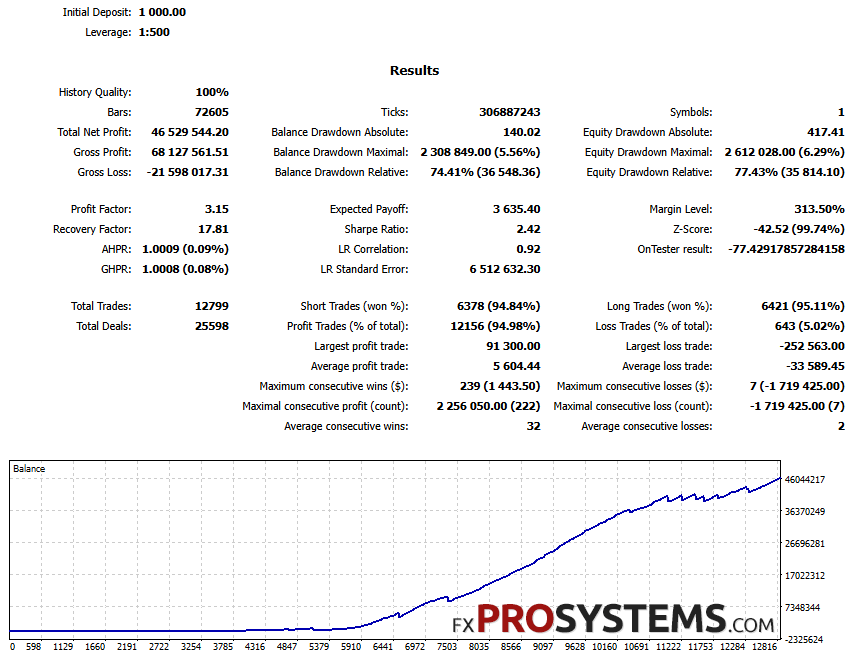
Test 5 — 2015–2026 | GBPUSD | Extreme Risk + 1-hour GMT shift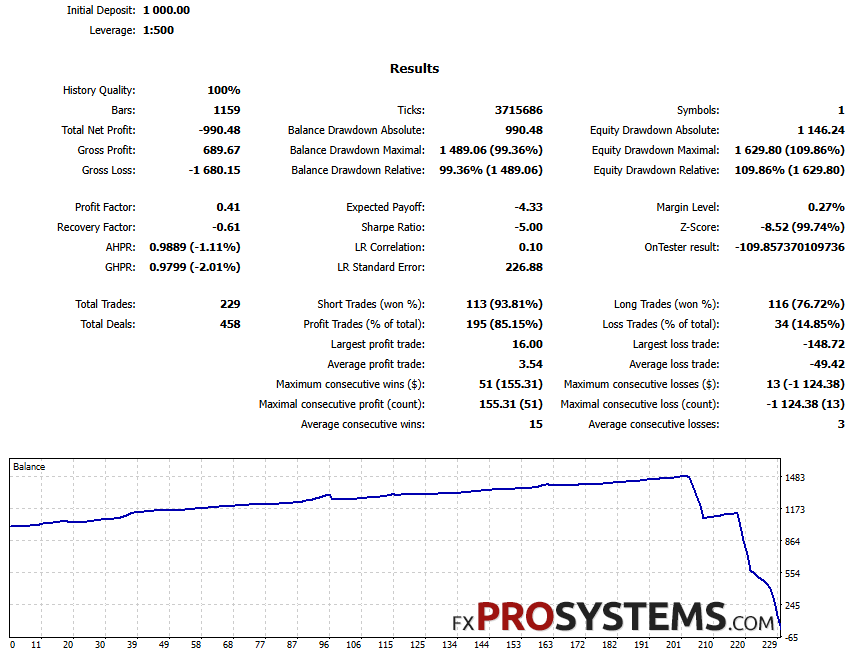
Test 6 — 2015–2026 | EURUSD not GBPUSD | Extreme Risk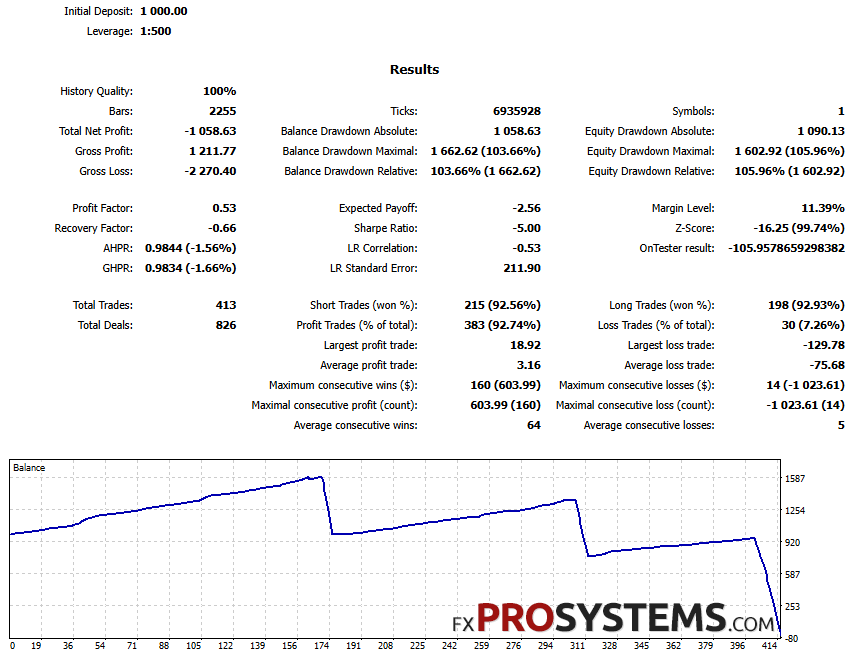
Test 7 — 2008–2026 | GBPUSD | Medium Risk | Additional Trades OFF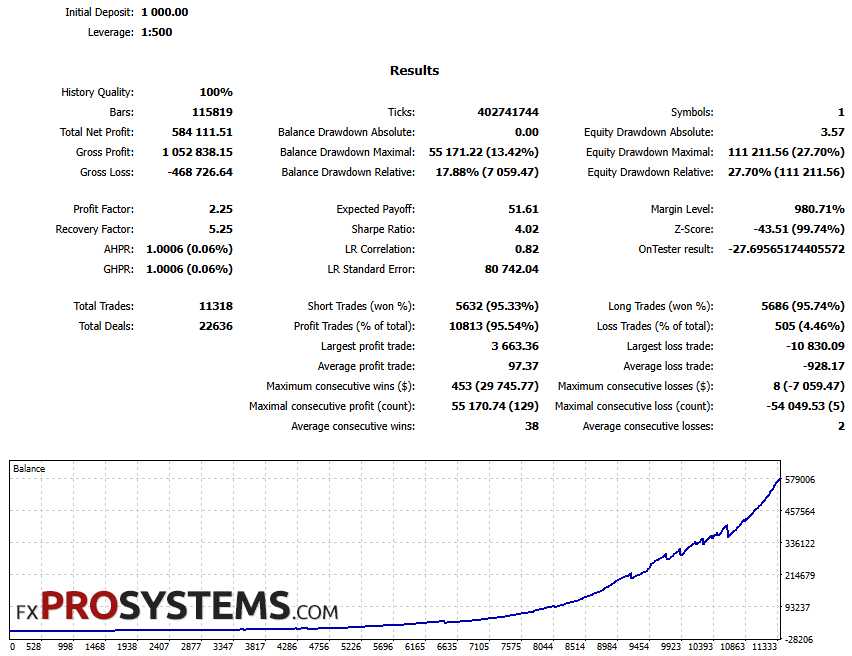
| Test | Net Profit | Profit Factor | Equity DD (relative) | Trades |
|---|---|---|---|---|
| 1. Default (Medium, GBPUSD, 2008–2026) | $547,459* | 2.54 | 26.04% | 12,606 |
| 2. Smart Recovery OFF (Medium) | $180,325* | 2.25 | 19.67% | 12,488 |
| 3. Very Low Risk (GBPUSD, 2008–2026) | $1,964 | 2.59 | 4.82% | 2,871 |
| 4. Extreme Risk (GBPUSD, 2015–2026) | $46,529,544* | 3.15 | 77.43% | 12,799 |
| 5. Extreme Risk + 1-hour GMT shift | -$990.48 | 0.41 | 109.86% | 229 |
| 6. Extreme Risk, EURUSD instead of GBPUSD | -$1,059 | 0.53 | 105.96% | 413 |
| 7. Additional Trades OFF (Medium) | $584,112* | 2.25 | 27.70% | 11,318 |
* Net profit figures at higher risk settings are inflated by auto-lot compounding on a growing balance and aren't realistic withdrawal figures — included to show how the risk scales, not as returns anyone would actually see.
A few things stand out.
The developer's own worst-case table undersells the real number. At Medium risk — the shipped default — my backtest shows equity drawdown of 26.04%, roughly double the 13.36% the manual's own table calculates for the “recovery batch also fails” scenario. The manual's number may be a simplified model rather than a full backtest. Either way, an independent backtest on the developer's own recommended settings runs meaningfully worse than the developer's own published worst case.
Two of these tests didn't just underperform — they destroyed the account. Test 5 and Test 6 both show equity drawdown past 100%, which means the account went into negative equity territory, not just a deep drawdown. I ran Test 5 specifically to check what happens with the broker's GMT offset set one hour off from what Quantum Emperor's defaults assume — same broker, same everything else, just the time-zone alignment wrong by a single hour. The result: 229 trades instead of 12,799 for the same period and settings, a maximum losing streak of 13 in a row (compare that to 7, which is literally the batch size the entire recovery table above is built around — 13 means multiple full batches failed back to back, not just one), and the account finishing underwater beyond its starting deposit.
The most likely technical explanation: Quantum Emperor's entry logic runs on H1 candles, and shifting broker time by an hour shifts every candle boundary the EA calculates against. Bollinger Bands, RSI, and the recent-swing-high/low lookback the entry signal depends on are all computed on a completely different set of price bars than the ones the strategy was actually tuned around. This isn't “reading the future” — it's a strategy that turns out to be extremely sensitive to one specific, exact alignment of the H1 clock, to the point that a single hour of misconfiguration is enough to wipe an account. That's a real risk for any live user who gets their broker's time zone setting even slightly wrong, which is an easy mistake to make and not always obvious when it's happened.
Test 6 tells a related story on a different axis. Running the same Extreme-risk settings on EURUSD instead of GBPUSD produced an almost identical collapse — negative equity, a 14-trade losing streak, a fraction of the normal trade count. The entry thresholds (RSI levels, the 03:00/21:30 time window, the specific pip distances) all appear to be tuned tightly around GBPUSD's particular volatility and session behavior. Move to a different pair without retuning anything, and the same mechanism that works on its intended pair stops working almost immediately.
The Z-Score is extreme and consistent across every clean test. Tests 1, 2, 4, and 7 — four independent runs, different settings each time — all show a Z-Score between -42 and -44, at 99.74% confidence. That's not a one-off statistical quirk; it's the same signature showing up every time the strategy runs on its intended pair with proper data. A Z-Score this far from zero indicates the win/loss sequence is far from randomly distributed — consistent with a system whose results are being carried by a specific, repeatable pattern rather than a broadly robust edge.
Smart Recovery off produces a real, direct comparison. Test 2 ran at 100% history quality, same as the rest of the batch, so it's a clean read: turning Smart Recovery off drops equity drawdown from 26.04% (Test 1, recovery on) to 19.67% — lower risk, at the cost of roughly a third of the net profit. That's the direct, real-world confirmation of the direction the developer's own worst-case table predicts, from an independent backtest rather than the manual's own model.
Turning off Additional Trades barely changed anything. Test 7 landed close to Test 1 on every metric. Whatever Additional Trades contributes, it isn't the main source of this EA's risk — Smart Recovery is.
The live signal
The product page links to a verified signal. Here's what it shows directly from MQL5.
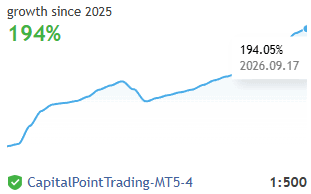
| Metric | Value |
|---|---|
| Initial deposit | $250.00 |
| Deposits added since | $3,608.70 |
| Withdrawals | $3,350.00 |
| Displayed "Growth" | 186.72% |
| Current balance / equity | $1,498.78 |
| Trades / Win rate | 1,006 (91.55%) |
| Sharpe Ratio | 0.17 |
| Drawdown by Balance / by Equity | 17.59% / 31.06% |
| Trades per week | 23 |
| Avg holding time | 14 hours |
| Subscribers | 0 |
| Started | 2025.09.18 |
The deposit pattern is the headline number here. $250 opened this account; $3,608.70 has been added since — more than 14 times the initial stake. Whatever the 186.72% “Growth” figure represents, it isn't $250 compounding on its own. This is the same pattern I found on the Quantum Queen X signal, and it lines up with what independent analysis reported about an earlier version of this same signal, described above. To be fair, I have no way to know from the public page alone whether these deposits were added to fund normal position sizing, to cover margin during a drawdown, or for some other reason — but the scale relative to the starting balance is large enough that the headline growth number shouldn't be read as an organic return on the stated initial deposit.
The rest of the signal's numbers are consistent with everything above: equity drawdown (31.06%) running well ahead of balance drawdown (17.59%), a Sharpe Ratio of 0.17 that's weak for a headline-grabbing growth figure, and zero current subscribers on a signal priced at $999 a month.
Input Parameters
Here's the actual settings panel, straight from a v7.5 installation, plain input names and the shipped default values.
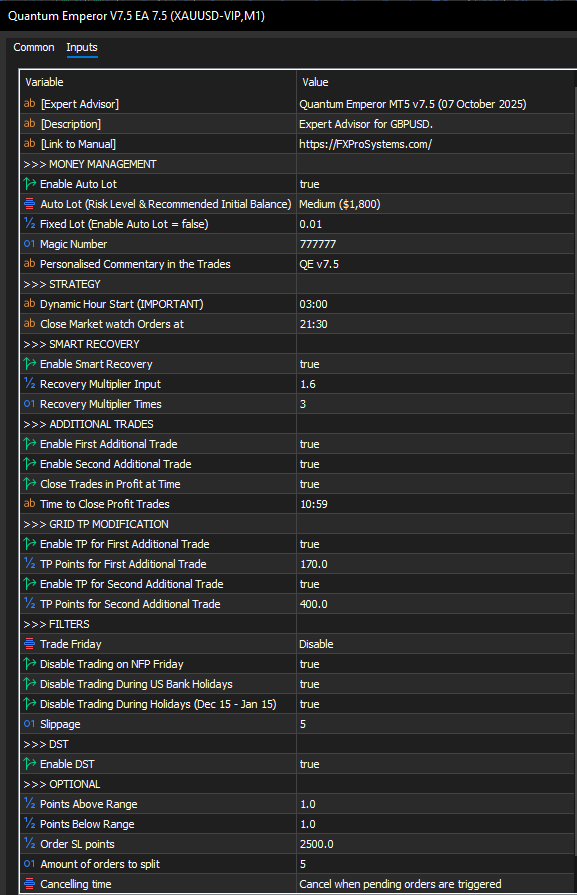
| Group | Parameter | Default value |
|---|---|---|
| Money Management | Enable Auto Lot | true |
| Money Management | Auto Lot (Risk Level & Recommended Initial Balance) | Medium ($1,800) |
| Money Management | Fixed Lot (used only if Auto Lot = false) | 0.01 |
| Money Management | Magic Number | 777777 |
| Strategy | Dynamic Hour Start (IMPORTANT) | 03:00 |
| Strategy | Close Market Watch Orders at | 21:30 |
| Smart Recovery | Enable Smart Recovery | true |
| Smart Recovery | Recovery Multiplier | 1.6 |
| Smart Recovery | Recovery Multiplier Times | 3 |
| Additional Trades | Enable First / Second Additional Trade | true / true |
| Additional Trades | Close Trades in Profit at Time | 10:59 |
| Grid TP Modification | TP Points, First / Second Additional Trade | 170.0 / 400.0 |
| Filters | Trade Friday | Disable |
| Filters | Disable Trading on NFP Friday | true |
| Filters | Disable Trading During US Bank / Other Holidays | true / true |
| Filters | Slippage | 5 |
| DST | Enable DST | true |
| Optional | Points Above / Below Range | 1.0 / 1.0 |
| Optional | Order SL points | 2500.0 |
| Optional | Amount of orders to split | 5 |
| Optional | Cancelling time | When pending orders are triggered |
The three flagged rows red are the whole recovery mechanism in one place: Smart Recovery is on by default, at a 1.6x multiplier, for up to 3 additional batches — exactly the settings behind the developer's own worst-case table earlier in this article, and behind the 26.04% real-world drawdown Test 1 found. The 2500-point Stop Loss and the 5-way order split are the other two numbers that define how large a single “trade” actually is before recovery even enters the picture.
One more detail worth a second look: the “Auto Lot” row lists Medium's recommended balance as $1,800, not the $1,000 minimum stated on the product page and in the Characteristics table above. That's a real gap between the headline minimum deposit and what the settings panel itself recommends for the default risk level — worth budgeting for the higher figure, not the lower one.
Which setfile to use: the four archives split along two independent choices — the season, and whether your broker's own server clock already shifts for DST or not.
- GMT+2 DST winter.set / GMT+3 DST summer.set — for brokers whose server time follows the standard GMT+2 (winter) / GMT+3 (summer) shift, but where the EA still needs its own Enable DST logic switched on to track the change correctly (e.g. IC Markets, VT Markets).
- GMT+2 DST off winter.set / GMT+3 DST off summer.set — for brokers on the same GMT+2/GMT+3 seasonal schedule, but whose server already applies the shift itself, so the EA's internal DST toggle needs to be off to avoid double-adjusting (e.g. Roboforex).
Load whichever file matches your broker's actual behavior — not just the current season — and switch to the "summer" or "winter" counterpart yourself when clocks change, since the correct Enable DST setting doesn't change with the season, only the specific time values do. When in doubt, load the file, check the Enable DST value it sets, and confirm that matches how your broker's own server time behaves around the DST changeover.
What could catch a trader off guard in live trading
- Broker time-zone misalignment isn't a cosmetic setting here — it's close to the single most important one. A one-hour GMT error turned a historically profitable configuration into an account-destroying one in my testing. Double- and triple-check the time-zone setfile matches the actual broker before ever running this live.
- “Not a single losing trade” reviews reflect batch-level accounting, not trade-level accounting. A batch can sit open and underwater for a long time before it resolves — the review pattern of “never seen a loss” is consistent with how the mechanism is designed to report itself, not necessarily with zero risk being carried.
- This is a GBPUSD-only strategy in practice, not just in name. Test 6 shows what happens when the same settings meet a different pair: a near-total collapse. Don't assume the logic generalizes.
- The live signal's growth number is inflated by deposits, similar to what I found on Quantum Queen X. $3,608.70 added against a $250 start means the headline percentage isn't a clean read on performance.
- The developer's own worst-case table is a floor, not a ceiling. My Medium-risk backtest ran roughly double the manual's own published worst-case drawdown for that setting.
Conclusion
Quantum Emperor is a genuinely unusual product in this developer's catalogue for one reason: it's the only one where the vendor publishes his own worst-case math for the recovery mechanism, in plain numbers, in the manual. That's a real point in its favor compared to most of this category, where you're left to discover the downside yourself. But my own testing found that real-world drawdown at the default Medium setting runs roughly double what that published table predicts, and two of my seven tests — one from a single hour of broker misconfiguration, one from simply running the same settings on a different pair — didn't just underperform, they took the account past zero equity. The recovery mechanism is real, it's described honestly as far as it goes, and it's also, per the developer's own numbers, capable of costing more than half the account at higher risk settings even when nothing goes wrong with the setup. The version of Quantum Emperor most reviewers are describing is the one running on exactly the right pair, exactly the right clock, at Medium risk or below. Outside that narrow envelope, the same mechanism the manual is honest about turns considerably less forgiving.
Elementary safety measures before running this live:
- Verify the broker's GMT offset and DST handling against the correct setfile before going live — test it, don't assume it
- Stay on GBPUSD; don't extrapolate this strategy's logic to any other pair without independently retesting it
- Treat Medium as the practical ceiling unless prepared for drawdown well beyond the developer's own published Extreme-risk worst case
- Don't change any setting outside time-zone alignment and risk level, per the developer's own instructions — this isn't a system designed to be hand-tuned
- Read the live signal's deposit and withdrawal history, not just the headline growth percentage, before treating it as a track record
- Use a reliable VPS and monitor for the specific failure pattern found here: a long losing streak (well beyond 7 trades) is the signal that a recovery sequence is compounding, not resolving
- Only use capital fully affordable to lose
For stable automated trading, I would recommend taking a look at the Gold Bundle
In the archive Quantum_Emperor_EA.rar (690 Kb):
- Quantum Emperor V3.2.ex4
- Quantum Emperor V3.6.ex4
- Quantum Emperor V5.1.ex4
- Quantum Emperor V5.8.ex4
- Quantum Emperor V7.5 EA.ex5
- quantum emperor 7.5 mt5 gmt+2 dst off winter.set
- quantum emperor 7.5 mt5 gmt+2 dst winter.set
- quantum emperor 7.5 mt5 gmt+3 dst off summer.set
- quantum emperor 7.5 mt5 gmt+3 dst summer.set
Free Download Emperor EA MT4 + MT5


