Trend indicator – only one trade a day

Trend Indicator is very simple and at the same time profitable indicator not repainting. According to this indicator signals we will open only one position per day for one currency pair. But the open position will not immediately as appear an arrow of Trend indicator, and when to do some action. More on that later.
Why this works: the logic behind the setup
This strategy is a specific implementation of a well-known approach called the Asian session range breakout. The Asian trading session (which the 00:00–03:30 GMT+3 window roughly captures) is typically the quietest part of the trading day — lower volatility, tighter spreads, fewer active participants. Price tends to consolidate into a narrow range during these hours.
When the London session opens, volume and volatility surge, and price frequently breaks out of that overnight range in one direction. The pending Buy Stop / Sell Stop orders placed just outside the range are designed to catch exactly that breakout — you're not predicting the direction, you're letting the market show you which way it's moving and entering along with it.
This is why the indicator only trades once a day: the setup only exists once per session, when the Asian range has fully formed and London is about to open.
Characteristics of Trend Indicator
- Platform: Metatrader4
- Currency pairs: Any
- Trading Time: One trade a day
- Timeframe: M30
- Recommended broker: Roboforex | VT Markets | XM
Rules of trade by Trend Indicator
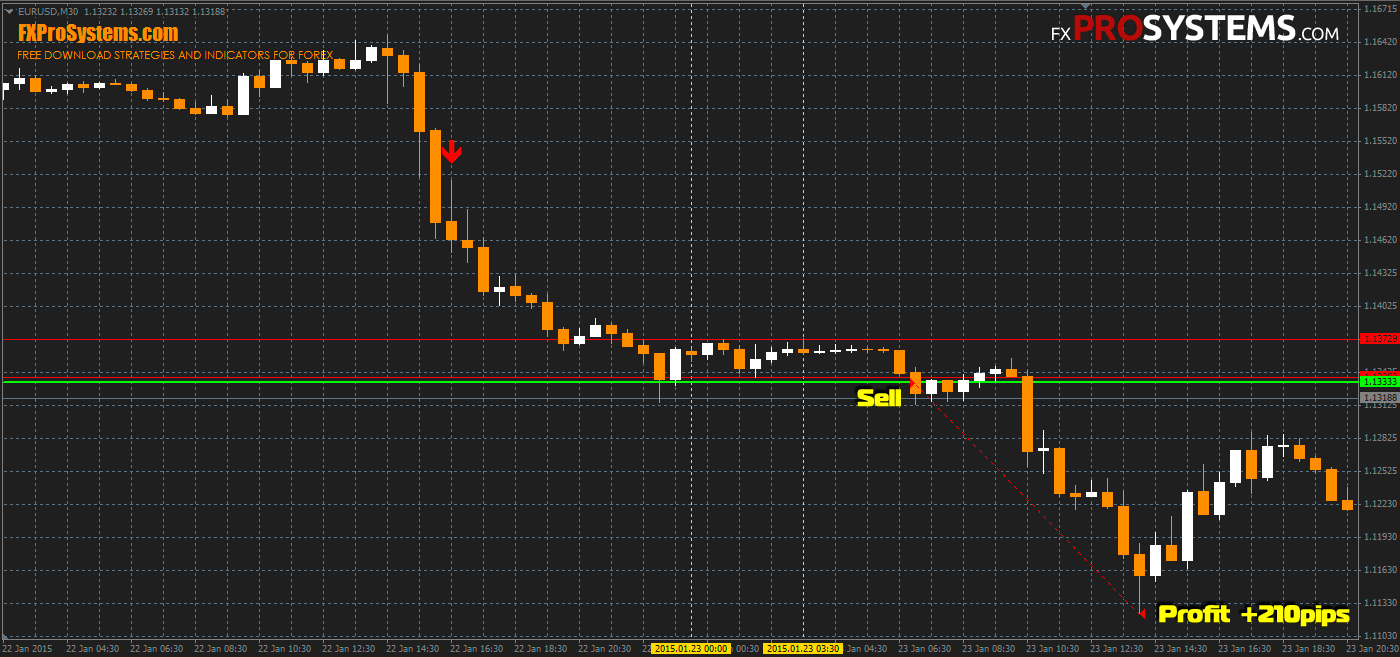
Short trade:
- Red arrow down.
- Draw lines on the maximum and minimum values of the prices (red horizontal line) in the time interval between 0: 00-03: 30 (GMT +3) (vertical yellow dotted lines).
- Set a Sell Stop pending order 5 pips below the minimum price marked by the red line (shown as a green horizontal line).
- Set your Stop Loss 1 pip above the maximum price marked by the upper red line.
Example Short trade:
Long trade:
- Green arrow up.
- Draw lines on the maximum and minimum values of the prices (red horizontal line) in the time interval between 0: 00-03: 30 (GMT +3) (vertical yellow dotted lines).
- Set a Buy Stop pending order 5 pips above the maximum price marked by the red line (shown as a green horizontal line).
- Set your Stop Loss 1 pip below the minimum price marked by the lower red line.
Example Long trade:
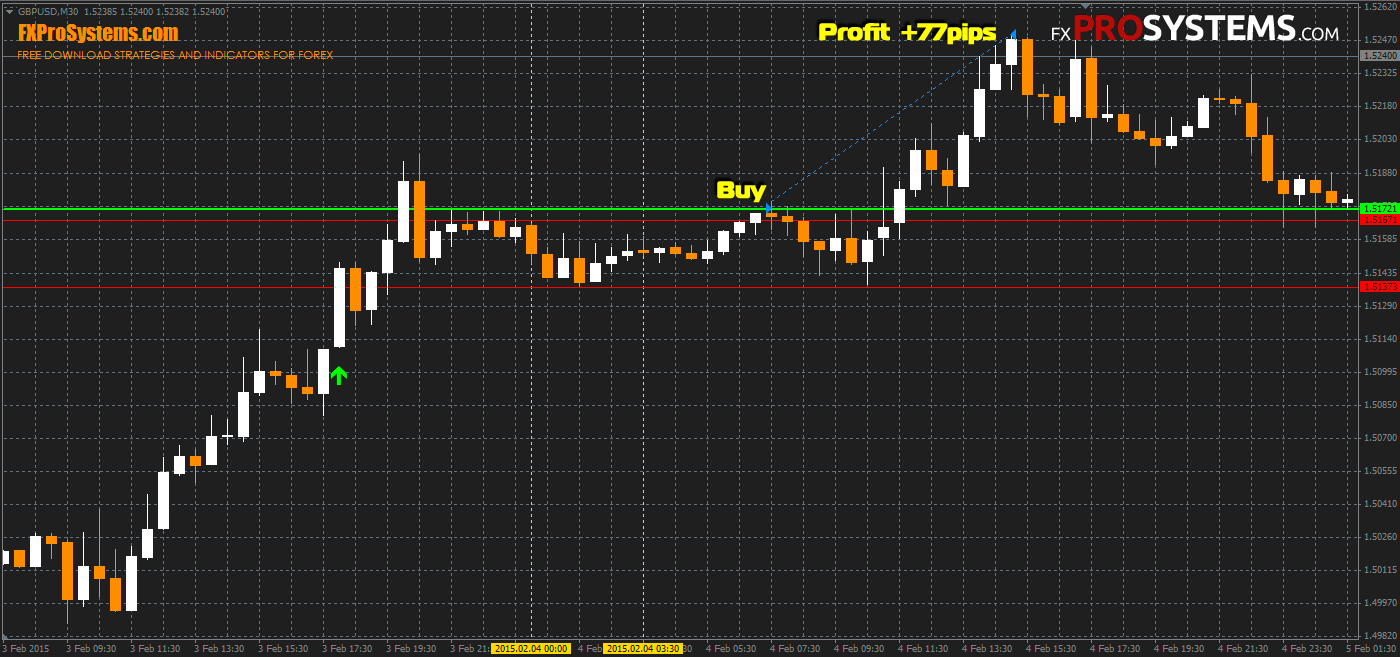
The author recommends a fixed Profit Target of 16 pips, but that can mean exiting the position too early. A trailing stop is usually the better option. Therefore it is better to use a trailing stop.
Some more features of trade by Trend indicator provided in the manual of the author, which can be downloaded below.
See also: JBR Trend Indicator, another well-established trend-confirmation system.
Tips for better results
A few things worth knowing if you're trading this system seriously, based on how range-breakout strategies like this typically behave:
- Check the economic calendar before trading. A major news release (NFP, central bank rate decisions) during or right after the range-forming window can produce a false, news-driven breakout rather than a genuine session transition — skip those days.
- Watch the width of the range. A very tight Asian range (a handful of pips) tends to produce stronger, more reliable breakouts than a wide, choppy one. If the range looks unusually wide on a given day, that's a signal to be more cautious, not necessarily to skip the trade.
- False breakouts are the main risk with this style of setup. Price can spike through the pending order, trigger your entry, and then reverse back into the range. This is the trade-off for not waiting for a candle close before entering — the manual mentioned in the archive covers the author's approach to this in more detail.
- On the profit target: the author's fixed 16-pip target (or a trailing stop, as recommended above) is one approach, but some traders size their target relative to the pair's Average Daily Range (ADR) instead — if a pair typically moves 80-100 pips a day and has already used up a chunk of that during the Asian session, your realistic breakout target for the rest of the day is smaller than on a day where the range hasn't moved much yet.
In the archive Trend_Indicator.rar:
- Trend.ex4
- Trend indicator.tpl
- Trand Indicator and Only One Trade a Day - System Manual.pdf
Free Download Trend indicator