FXProSystems
Back

MegaFXProfit Indicator
Published: 21.06.2014
Reading time: 6 minutes
22
99528

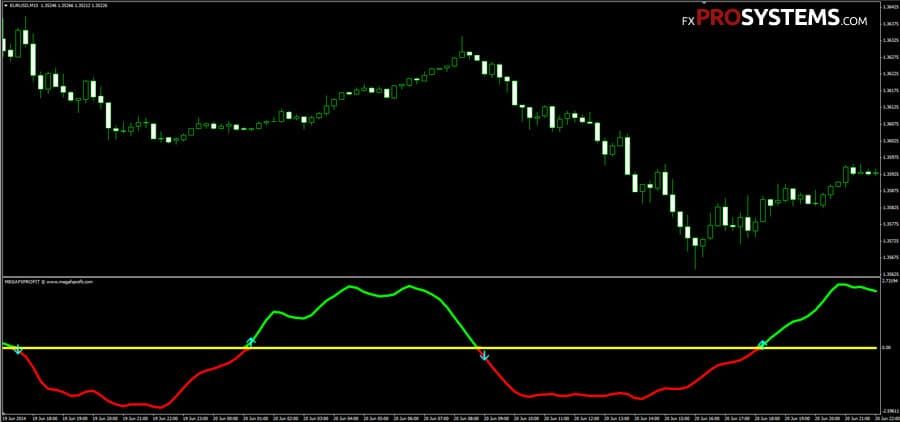
MegaFXProfit Indicator can be used for trading in any currency pair and any timeframe. This indicator is intended for trade intraday, but at higher timeframes (H4 and above) it can be used around the clock. MegaFXProfit intuitive indicator, therefore it can work even a novice trader.

Сharacteristics of MegaFXProfit

fx-profit

Take Profit be installed depending on the selected timeframe (M5 - 15 pips, M15 - 20 pips, M30 - 25 pips, H1 - 30 pips, etc.) Stop Loss - 10-15 pips.

Open position Buy or Sell after closing the signal candle:

mega-fx-profit

In the archives MegaFXProfit.rar:

  • Mega_Fx.ex4
  • Mega_Fx.mq4

Free Download MegaFXProfit

Author:
Daniel
Share
Related Post
Comments:
  • Robert
    Published: 07.08.2014 Reply to the message

    Cool indicator! Fanks

  • gafet
    Published: 10.09.2014 Reply to the message

    Hi,

    yes it's good indicator but it repaint :(

    • slawomir
      Published: 16.02.2016 Reply to the message

      Hi! Try to add two levels, 0,5 and -0,5, open only when the line is over or below this levels. It protects u of repaint in 90 %! =)

      • Princepamas
        Published: 18.05.2016 Reply to the message

        Hi Slawomir, How do I add two levels (0.05 and -0.50). please kindly explain . thanks

  • Tomi
    Published: 10.03.2015 Reply to the message

    yeah it repaints looks great in past. too bad

  • Peter
    Published: 16.07.2015 Reply to the message

    cant open rar

  • JB
    Published: 10.06.2016 Reply to the message

    Princepamas - If you're in MT4, just add a two horizontal lines. Put your cursor on the horizontal line symbol, left click and hold. Drag it to the Mega FX window and release it. Under Parameters make the value 0.5. Then repeat the process but make the value on the second one -0.5.

    If the horizontal line symbol is visible above the chart, go to View, Toolbars, and make sure LineStudies is checked.

    JB

  • JB
    Published: 10.06.2016 Reply to the message

    You can also just click on the Levels section of the Mega FX indicator and add both of the levels, 0.5 and -0.5, there.

  • kostas
    Published: 21.06.2016 Reply to the message

    Hello guys!How can i use the indicator after i add the lines?what are the rules with the lines inside the indicator's window?

  • STEPHEN
    Published: 26.06.2016 Reply to the message

    You enter a trade when the line cross above or below 0.5 and -0.5

  • tom
    Published: 09.07.2016 Reply to the message

    how does drawing a line stop it repainting ??????????????

  • Juliana
    Published: 19.07.2016 Reply to the message

    Hi

    I have try putting the indicator on the chart but sometime I can see the signal alert is not very correct in some time frame and also do not understand where they get the level, is the alert given when the green or red arrow is confirmed. Could anyone have any idea?

  • Smithb863
    Published: 07.02.2017 Reply to the message

    Some really nice and useful information on this web site, also I conceive the style and design holds superb features.

  • vin
    Published: 18.07.2018 Reply to the message

    dont use on lower time frame one hour and above.....try it on demo it accurate and give super signal

  • Hanan
    Published: 22.04.2019 Reply to the message

    Hi there how do I get the files on ex4 cause I cant load rar. file on mt4, any help please

    • Daniel
      Published: 23.04.2019 Reply to the message

      Use the WinRAR program to open the downloaded archive.

  • Kostarikanac
    Published: 07.06.2019 Reply to the message

    I have downloaded the compressed file MegaFXProfit.rar but I do not know how to enter it into MT4. Help me. Thanks.

  • Numeric
    Published: 07.11.2020 Reply to the message

    This indicator is quite good and easy to use ,, I have tried the performance ... the accuracy is decent.
    Of course, also with good risk management in your trading. now I will build a robot using this indicator with automatic trading 8)

    • Shashank
      Published: 18.11.2020 Reply to the message

      Hello Numeric

      Would appreciate if you can share the robot if already developed using the indicator.

      Thanks

  • Shashank
    Published: 18.11.2020 Reply to the message

    Hello Numeric

    Would appreciate if you can share the robot using this indicator .........if ready and built.

    Thanks

  • client.csc
    Published: 14.12.2020 Reply to the message

    can you provide this indicator in Pine Script (Tradingview.com)?

    thanks & regards

  • William mark
    Published: 01.07.2024 Reply to the message

    Please how can i use this i this indicator to trade stock and whic brokage can i integrate it with

Name
Please enter your last name and first name
E-mail
No spam, we promise
Message text
By submitting this form, you agree to the political confidentiality and rules of our site.