Scalper Inside PRO — NG TDA Trend Algorithm with 3 Strategy Templates

Scalper Inside PRO is an innovative indicator designed for fast and accurate trend detection in financial markets. Its proprietary Next-Generation Trend Detection Algorithm (NG TDA) automatically calculates optimal position opening and closing times, providing traders with detailed statistics of work on selected time intervals. The indicator is suitable for both beginners and experienced traders due to its simple rules of use and wide customisation options. It is not repainted and has a unique feature - to connect your own custom indicator to generate trading signals.
Update: the "no signals" issue several readers ran into has been identified and fixed — it wasn't a problem with the indicator's logic, but with how it needs to be installed. The indicator has been updated to v7.9, and starting with this version, it must be installed via template files rather than the standard drag-and-drop method. See the Installation section below for exact steps — following it should resolve the "no signals on the chart" issue entirely.
Characteristics of the Scalper Inside PRO v.7.9
- Platform: Metatrader4
- Indicator version: 7.9
- Currency pairs: Any currency pairs, recommended major, cryptocurrencies, metals, stocks, indices
- Trading Time: Any trading sessions, recommended London and New York
- Time Frame: Any, recommended M5
- Recommended broker: Roboforex | XM | Tickmill
Working principle and trading algorithm
Scalper Inside PRO has a number of key features:
- Exclusive trend detection algorithm (NG TDA) - high accuracy of signals
- Automatic opening and closing of positions - simplifies the trading process
- Multi-level profit taking system - three Take Profit levels
- Detailed statistics - evaluation of indicator and custom strategies
- Possibility to connect custom indicators - testing and calculating their profitability
- Flexible settings - adapts to any trading instruments and timeframes
- No repainting - reliable signals
- Ease of use - clear interface and customisable visual parameters.
Scalper Inside PRO is based on the NG TDA algorithm, which analyses market data to identify a trend. The indicator automatically calculates entry and exit points for trades.
The main modes of position opening are:
- Next Candle Entry - opening a position on the next candle after the signal
- Delta Entry - opening a position when the calculated entry level is reached, which helps to filter out false signals. This is the method I recommend.
Exit Settings:
- Auto Calculate SL - automatic calculation of the stop loss
- Reversal SL - Close on reverse signal
- Manual TP and SL - the ability to set Take Profit and Stop Loss levels manually
The indicator has the possibility of backtesting, about this and much more in this video:

Trading rules
Open BUY:
- Select a trading instrument with a high Win Rate (optimisation can be done beforehand)
- Wait for the next signal (blue arrow)
- Open a position when the price reaches the entry level (Delta Entry Mode)
- Closing the whole open position (or part of a position) at TP Levels
- Stop Loss - Auto Calculate SL, Reversal or Manual SL

Open SELL:
- Select a trading instrument with a high Win Rate (optimisation can be done beforehand)
- Wait for the next signal (red arrow)
- Open a position when the price reaches the entry level (Delta Entry Mode)
- Closing the whole open position (or part of a position) at TP Levels
- Stop Loss - Auto Calculate SL, Reversal or Manual SL

Scalper Inside PRO settings

Main parameters:
- Select Strategy - selection of strategy (Strategy-1, Strategy-2, Custom Indicator)
- Sensitivity - sensitivity setting for strategies (-5 to +18)
Custom Indicator settings:
- Set [Select Strategy] = Custom Indicator
- Enter the name of the custom indicator in [Custom Indicator Name]
- Specify the graphic buffers (usually Buffer-0 for buying and Buffer-1 for selling)
- Verify that the custom indicator signals match the signals displayed by Scalper Inside PRO
Additional Settings:
- Visual Settings - selection of colour theme and panel scale
- Alerts Settings - Set up alerts (audio, pop-up, email)
- History Bars for Calculation - number of bars to analyse
All of these properties are duplicated on the Control Panel:

Installation
Starting with v7.9, Scalper Inside PRO must be installed using template files rather than by attaching the indicator directly to the chart. This is the most common source of the "no signals" issue reported in the comments below — if you installed an earlier version the standard way, that's almost certainly why it looked broken.
In the archive, you'll find four template files depending on which strategy you want to run:
- Scalper Inside PRO v7.9.tpl — base indicator only
- Scalper Inside PRO v7.9 + Strategy1.tpl
- Scalper Inside PRO v7.9 + Strategy2.tpl
- Scalper Inside PRO v7.9 + Strategy3.tpl
To install: open the chart you want to trade, right-click → Template → Load Template, then select the .tpl file matching the strategy you want.
Changing settings: because the indicator is now template-based, adjusting parameters (Sensitivity, Visual Settings, Alerts, etc.) isn't done through the usual in-terminal properties window — you'll need to edit the template file directly. Open the relevant .tpl file in a text editor (Notepad++ works well), locate the <inputs> section under <expert> name=Scalper Inside PRO v7.9 (starting from line 209026), and change the parameter values there before reloading the template.
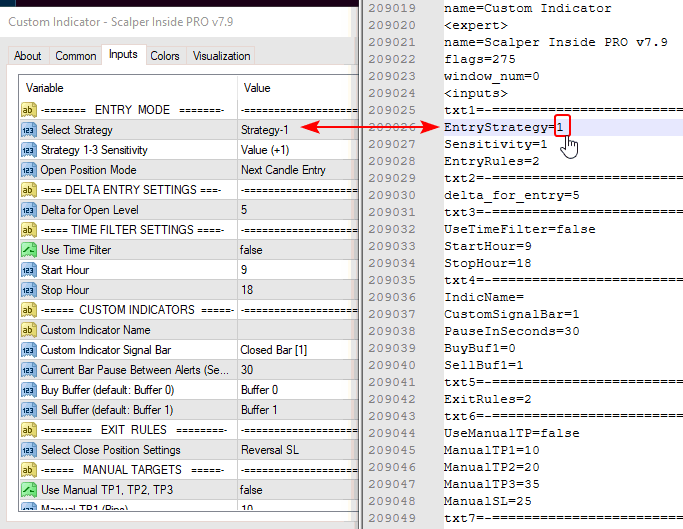
One more thing to expect on first install: the indicator may prompt you to download historical data for the pair you're loading it on. If this happens, press F2 in the terminal to open the History Center and download the missing data — the indicator won't generate signals correctly without it.
Conclusion
Scalper Inside PRO provides traders with a universal tool for analysing and trading on the market. The ability to adapt the indicator to different timeframes and trading instruments allows you to effectively use it in any trading strategy. Connecting custom indicators expands the functionality, allowing you to test and improve your own developments. The absence of overdrawing makes the signals reliable, and flexible settings help to avoid false entries. That said, it's not a holy grail — losing trades will happen, and the best way to limit their impact is through solid money management, preliminary testing on a demo account and choosing a broker with the smallest spread.
If you're looking for a broader comparison of scalping indicators in this style, see our review of Ultimate Pro Scalper.
In the archive Scalper_Inside_PRO_V7.rar (1.067 MB):
- Scalper Inside PRO_V7.ex4
- Scalper Inside PRO v7.9.ex4
- Strategy1.ex4
- Strategy2.ex4
- Strategy3.ex4
- Scalper Inside PRO v7.9.tpl
- Scalper Inside PRO v7.9 + Strategy1.tpl
- Scalper Inside PRO v7.9 + Strategy2.tpl
- Scalper Inside PRO v7.9 + Strategy3.tpl
Free Download Scalper Inside PRO v 7.9