FXProSystems
Back

Forex Jupiter - probably the most accurate trend indicator

Published: 29.10.2024
Reading time: 14 minutes
82
20675

A quick reality check before we go further: readers in the comments have pointed out that Forex Jupiter appears to be a repackaged version of an older indicator, Apollo Scalper, adapted for the current MT4 terminal and relaunched with an "AI" label. I haven't independently verified the code, but the pattern is a familiar one in this space — take an existing tool, wrap it in new branding and a few buzzwords, and sell it (or in this case, distribute it) as something new. Worth keeping in mind as you read the rest of this review.

Characteristics of the Forex Jupiter Indicator

How does it work?

The indicator generates buy/sell signals — all you have to do is trust it (and, by extension, trust it with your money) and open the position. It also suggests optimal Take Profit and Stop Loss levels for each signal:

SELL signal

forex-jupiter-sell-signalv

BUY signal

forex-jupiter-buy-signal

Trading can also be fully automated with Forex Jupiter Manager, which opens trades based on the indicator's signals. You can run it in Manual, Semi-Auto (confirm each trade manually), or Full Auto mode. It also supports a news filter to pause trading around major releases, and a configurable maximum spread limit to protect you during volatile conditions. For position sizing, you can choose between a fixed lot or a percentage of your balance per trade.

This video shows the Indicator and Expert Advisor in action:

How profitable this Indicator + Manager combination turns out to be in real trading is something you can only judge by live results — the combo can't be meaningfully backtested. And as always: never run an EA in automatic mode on a real account without first testing it on demo. You can share your results of using this system in the comments below or in our community.

If you want a more established alternative in this space, JBR Trend Indicator has a longer track record and more transparent trading rules.

In the archive Forex_Jupiter.rar (7.49 M) Password: fxpro

  • Forex_Jupiter_Manager.ex4
  • Forex_Jupiter_Indicator.ex4

Free Download Jupiter Indicator + Forex Jupiter Manager

Free Download

Official website ➔ Forex Jupiter current Original version

Jupiter official website

Mirror

Author:
Daniel
Share
Related Post
Comments:
  • tope
    Published: 29.10.2024 Reply to the message

    Hello Daniel, The systems folder requires a password. what is the password pls?

    • Daniel
      Published: 29.10.2024 Reply to the message

      fxpro

    • Dey
      Published: 08.11.2024 Reply to the message

      indicator s running good

  • gopal
    Published: 29.10.2024 Reply to the message

    no run hmmmmmm

  • chris
    Published: 29.10.2024 Reply to the message

    IH Mr Daniel, my name is chris from niigeria, i download forex jupter indicator from your web site, i try to open the fill is asking me for pass word please can you help me with it? thanks

    • Daniel
      Published: 29.10.2024 Reply to the message

      fxpro

  • James
    Published: 29.10.2024 Reply to the message

    Is this updated 1420?
    Unable to load Indicator.

    EA is running good, but not indicator.
    srvcli has been placed in the root folder.

    • Daniel
      Published: 29.10.2024 Reply to the message

      So the problem is with the operating system, I recommend using a licensed Windows 10

  • Juan Felipe
    Published: 29.10.2024 Reply to the message

    Good morning I don't work I put it in a demo account and it doesn't even show the buttons and colours that you see in the video and images.

    • Daniel
      Published: 29.10.2024 Reply to the message

      You must have installed it wrong. Did you install the DLL in the root folder of the terminal?

  • rahmat
    Published: 29.10.2024 Reply to the message

    EA is running good, indicator s running good. Try it first at demo account. thanks Daniel

  • Siarhei
    Published: 29.10.2024 Reply to the message

    This indicator does not work

    • Daniel
      Published: 29.10.2024 Reply to the message

      Just because it doesn't work for you doesn't mean it's not working.

  • tope
    Published: 30.10.2024 Reply to the message

    A lot of us are having serious difficulty in using this indicator. I believe the DLL goes into the library folder. Even after putting the DLL file into the library folder, and then reopen the mt4, and try to attach the indicator, it does not show. Please Daniel , what could be the problem?

    • Daniel
      Published: 30.10.2024 Reply to the message

      There's a problem with your antivirus. Add this file to the exceptions for your antivirus.

      • tope
        Published: 30.10.2024 Reply to the message

        I did add all the files in the forexjupiter folder as exemption, I also use a genuine window 11 and i disabled my antivirus for the process at a time...yet nothing is showing whenever the indicator is attached all though i think the expert seems to be showing perfectly the smile icon on the chart

  • Alex
    Published: 30.10.2024 Reply to the message

    Broken link! The archive is empty! Can't download! Please add a mirror!!!!!

  • Alex
    Published: 30.10.2024 Reply to the message

    Оокк *IN LOVE* *IN LOVE*

  • nyama iviwe
    Published: 01.11.2024 Reply to the message

    please help me how to trade 😢

  • Kinex
    Published: 01.11.2024 Reply to the message

    Guys lets all be patient, he does this for free. It works, just follow the steps.
    Thanks Daniel.

    • Daniel
      Published: 01.11.2024 Reply to the message

      *THUMBS UP*

  • Alex
    Published: 02.11.2024 Reply to the message

    When working with this indicator, pay attention to this fact: Efficient Market Hypothesis (EMH) is a theory that states that financial markets are informationally efficient, meaning that prices of assets fully reflect all available information at any given point in time. This theory was first proposed by Eugene Fama in his 1970 paper “Efficient Capital Markets: A Review of Theory and Empirical Work.” According to EMH, it is impossible to consistently beat the market by using any information that is already available to the public, as prices will always adjust to reflect that information. There are no Holy Grails in trade! In addition, Forex Jupiter is nothing but a forgotten, reworked old! It's nothing but forgotten and remade, for a new terminal, Apollo Scalper, but in a new package! Apollo Scalper worked and works, only on the old terminal 1355! So from here there is a conclusion: no artificial intellect exists!!! Stop believing nonsense!! AND THE MOST IMPORTANT THING: ✔️ MetaTrader developers constantly update MT4 terminals to improve protection, including to prevent users from using cured products such as FIX and others. ✔️ It is because of the change in the architecture of the terminal that it may be so that over time, the cured FIX robots of the FIX version or versions with DLL files will not work on new builds. ✔️ As one of the ways to circumvent this protection, it is a forced ban on updating MT4 terminals. But unfortunately, over time, old versions of terminals are forcibly prohibited for use, which is why an error appears in the terminal: "Old version". This means that the terminal needs to be updated to the "working version", which periodically leads to a vicious circle with non-working FIX.

    At the moment, all terminals with a build below 1420 will give an "Old version" error. To work, you need to update the terminals to the working version. If you use advisors or indicators of the FIX type, you need to either wait for new versions with adaptation to working builds, or manually adjust the accounts and change the robot.

    😎 That's why I recommend using original advisors and indicators for trading.

    • Daniel
      Published: 02.11.2024 Reply to the message

      This is all perfectly well known to us, thanks mate. And the fact that AI is a marketing scenery and that original Expert Advisors and Indicators work better than fixes. But, I think, no wallet will be enough to buy all the variety of trading tools that are available on the market now. That is why for many people it is the only option to try a fix. And if you like this or that product very much, you can buy the original.

    • tope
      Published: 03.11.2024 Reply to the message

      Lol,,,same old thingy...lots big grammar...same meaningless stuff....same old marketing gimmick from the days of mt4 build 1320 . All this for 9usd? when you claim that theire is a guranteed way of taking 100usd to 10k usd...lol...damn...this is the most funny marketing read i have seen this year

  • Alex
    Published: 02.11.2024 Reply to the message

    *DRINK*

  • Douglas peters
    Published: 02.11.2024 Reply to the message

    Hello please can I get Orion Gold Scalper EA v4 0

    • Daniel
      Published: 04.11.2024 Reply to the message

      You can download it on our Telegram channel

  • Nik
    Published: 02.11.2024 Reply to the message

    Sir, please suggest an ea to pass funded account challenge

  • Jiangshi
    Published: 06.11.2024 Reply to the message

    Hello Daniel.
    I have been setting up foreign exchange Jupiter (FullAuto) since last week,
    My order has never been confirmed.
    Is there any setting?
    Also, the Forex Gold Investor EA has been stopped since the last trade 2024.11.01.

    • Daniel
      Published: 06.11.2024 Reply to the message

      Hi. What order and settings are you talking about?

  • Jiangshi
    Published: 07.11.2024 Reply to the message

    Hello, Daniel.
    "Jupiter Indicator" is the default setting. "Jupiter Manager" setting is also default except for lot number. I set "Full Auto" with the "Jupiter Manager" button on the chart, but no orders have been placed so far. yeah.

    • Daniel
      Published: 07.11.2024 Reply to the message

      Do you have automatic trading enabled in your terminal? Is the smiley face smiling?

  • Jiangshi
    Published: 07.11.2024 Reply to the message

    yes!
    Smiley ^^ I'm laughing out loud!

  • pang
    Published: 07.11.2024 Reply to the message

    EA is no available

  • Ahm
    Published: 08.11.2024 Reply to the message

    Hi Daniel,

    Thanks a lot for this great job.

    It took only one trade for me and nothing else since this morning, is there anything to set?
    Kinds regards.

  • Blunder
    Published: 13.11.2024 Reply to the message

    Hi Daniel, thanks for the EA. But why can't the EA open positions automatically?

  • Curlin
    Published: 23.11.2024 Reply to the message

    hi thank you so so so much for this indicator, we are very lucky to get this baby for free cause lot of websites and people is asking money to give this system....may god bless you more for blessing us with getting money on trading without stress lol :-D :-D :-D :-D

  • Murrey
    Published: 02.12.2024 Reply to the message

    Too many viruses in the files. Are you working with Bill Gates?

    • Daniel
      Published: 02.12.2024 Reply to the message

      Yeah, I'm his right-hand man. You're welcome to pass by if you're worried about viruses :-D

  • Lee
    Published: 10.12.2024 Reply to the message

    2024.12.10 15:02:32.030 news_ind.ex4 USDCAD,H1: Alert: 硒栳赅 镳?恹珙忮 InternetOpenUrlA()
    News URL??
    Can you provide a news link?

  • Gio
    Published: 04.01.2025 Reply to the message

    thanks Daniel...autotrading is working very well except on gold....but no problem....working on real account....just microlots....testing tp strategy and opposite signal closing...i'll let know all about results...balance now is positive...of course working on vps...and i stopped antivirus before istalling dll in mt4 root folder....thanks a lot...nice work...good product

  • Sergei
    Published: 05.01.2025 Reply to the message

    Thanks Daniel, the indicator is working fine.

  • Tony
    Published: 12.01.2025 Reply to the message

    We appreciate offering Forex Jupiter to use freely however the indicator doesnt display on the chart when loaded. The journal indicates that the indicator is loaded then removed within 1 or 2 seconds.

    Also all files have been installed correctly in their respective folders & Windows Antivirus switched off. Im using Windows 10 Pro version.

  • Yuriy
    Published: 13.01.2025 Reply to the message

    *IN LOVE* Hi Daniel! I am from Russia and I am very grateful to you. Everything is working perfectly!
    Guys havе broblems because of not inserting srvcli.dll correctly. The guys must go to the root directory not from MT4, but this way C:\Program Files (x86)\E-Global Trade MetaTrader 4 Terminal. Of course, the terminal will be of their own broker/
    Best regards.

    • Daniel
      Published: 13.01.2025 Reply to the message

      This is what I meant when I wrote that should copy it to the root folder of the terminal

      Thanks *THUMBS UP*

      • Jose
        Published: 26.05.2025 Reply to the message

        I have done all this but it is still not working

    • Iyad
      Published: 01.09.2025 Reply to the message

      is there a URL links must be added to MT4 to make the ea work ?

  • Harris
    Published: 14.01.2025 Reply to the message

    Please someone send me best settings for this ea

  • Yuriy
    Published: 15.01.2025 Reply to the message

    Forex Jupiter have worked till today and stoped

  • Yuriy
    Published: 16.01.2025 Reply to the message

    It was because of the antivirus. Now everything is fine again.

  • gondlir
    Published: 16.01.2025 Reply to the message

    After clicking on a Download opens a web with This fxprosystems.com page can’t be found

  • gondlir
    Published: 17.01.2025 Reply to the message

    can you upload new link, because it says there is nothing on a page?
    thanks

    • Daniel
      Published: 17.01.2025 Reply to the message

      Please use Mirror

  • Steve
    Published: 17.01.2025 Reply to the message

    Don’t you have the mt5 version to try it on synthetics index of deriv, i think this look really good

  • gondlir
    Published: 18.01.2025 Reply to the message

    hello, can you post new link, this one is not working?!

  • gondlir
    Published: 18.01.2025 Reply to the message

    thanks!!

  • Akhli
    Published: 05.02.2025 Reply to the message

    Hi Daniel,

    I am looking for trend following bot scalping bot, which can work for prop firms and live accounts. Can you please suggest?

  • Cosbi
    Published: 16.02.2025 Reply to the message

    Is this indicator suitable for mobile phones?

    • Daniel
      Published: 16.02.2025 Reply to the message

      No, only for Metatrader4 on PC

  • Ravi
    Published: 22.02.2025 Reply to the message

    Sir, do you have ex5 file of this bot, to use in mt5

  • Rapelang
    Published: 23.02.2025 Reply to the message

    Hi ...Where do we find root folder in our Mt4? And after pasting dll into that folder..we just drag and drop indicator on the chart it'll show up??

    • Daniel
      Published: 23.02.2025 Reply to the message

      Hi,
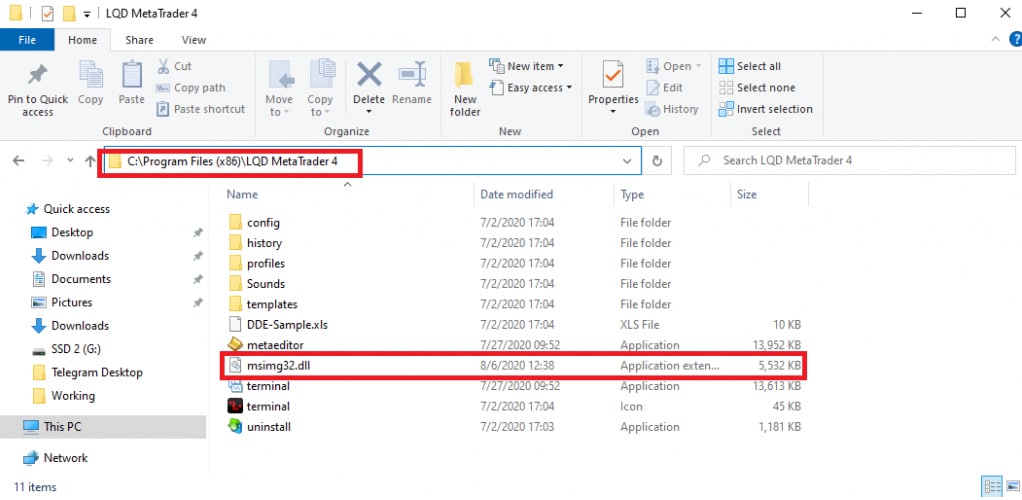
      The root folder is where the installed terminal is located on your computer. It is usually C:\Program Files (x86)\...

      root-folder-mt4

      After that - yes, you can install it by simply dragging and dropping it onto the chart.

  • Zayyad
    Published: 09.04.2025 Reply to the message

    Hello Daniel, I've done everything required for the forex Jupiter I put the necessary folder in their place but the indicator doesn't show on my chart? Pls how can I solve this problem? Thanks

  • Kren
    Published: 07.05.2025 Reply to the message

    It works both indicator and manager, it works auto trading. Now I will testing 12 pairs for some time on demo.

  • Juan Pablo
    Published: 26.05.2025 Reply to the message

    Dear Daniel ,

    Warm greeting from Colombia, south America, I don´t know if you speak a little spanish. MIL GRACIAS Y BENDICIONES POR AYUDAR A LAS PERSONAS QUE RECIEN EMPEZAMOS Y NO TENEMOS LOS RECURSO PARA COMPRAR INDICADORES. I am an English teacher that is why I could find your site. I managed to instal the indicator , It is running but it works only in the 1h timeframe. Any additional recommendation for settings so that it works in other time frames. Please, igonore all those envy post and nagging comments. YOU ARE AMAZING. Tons of blessings

    • Daniel
      Published: 26.05.2025 Reply to the message

      Thank you for your kind words. Perhaps, when changing timeframe, the indicator should be dragged to the chart again? Unfortunately, I have no opportunity to check it now.

  • Juan Pablo
    Published: 27.05.2025 Reply to the message

    Dear Daniel, I managed to set up the indicator , It seem to be working but I doesn´t take any trade in the automatic mode. The smily face appears in the upper right hand corner. What can that be? Thanks for answering, sorry for bothering you questions

    • Daniel
      Published: 27.05.2025 Reply to the message

      A smiley face signals that the EA is enabled and working

  • momo
    Published: 04.07.2025 Reply to the message

    the indicator is not working i need it badly plz

  • momo
    Published: 05.07.2025 Reply to the message

    i need the indicetor its not working

    • Daniel
      Published: 06.07.2025 Reply to the message

      Please take it HERE

  • Jiangshi
    Published: 07.07.2025 Reply to the message

    There has been an update to the build number, but what are the implications?

  • Enis
    Published: 08.07.2025 Reply to the message

    Hi Daniel

    Today ive loaded up Forex jupiter on mt4 ive loaded up the Ea file and that is working fine but not the actual indicater and ive placed the file in indicater file and then refreshed the page and still does not load on to charts is there another file or something needed or perhaps forward to my email.

    Regards
    Enis

  • Lennin
    Published: 11.08.2025 Reply to the message

    Which is the best filter and SL and TP to be able to operate it and the best pairs.

  • Aleksandar
    Published: 20.08.2025 Reply to the message

    Hello, I tried using this indicator, but it doesn’t work on my chart. Could you please check why?

  • Sergey
    Published: 04.09.2025 Reply to the message

    Hello, this indicator has a fairly simple logic. As soon as the M15 candle closes under the H4 candle, the indicator changes the trend to downward. The same applies to upward movement. So those who use it can easily do without it.

  • ravi
    Published: 09.10.2025 Reply to the message

    Guys its working.

    You make sure you install it in any xbroker eg Roboforex installation so built will not be an issue. I am using built 1441 mt4 and you need to put that dll ile to mention location and indicator and EA. Reboot your MT4 and it will work, thats it.

  • ravi
    Published: 09.10.2025 Reply to the message

    Also one more tip: to see that indicator in new chart, make sure you open chart in new tab and re apply indicator rom scratch

  • blockman
    Published: 20.11.2025 Reply to the message

    can't download

  • Stefan Basson
    Published: 20.11.2025 Reply to the message

    I have download the Jupiter system but connot let it run

Name
Please enter your last name and first name
E-mail
No spam, we promise
Message text
By submitting this form, you agree to the political confidentiality and rules of our site.