EA Black Dragon MT5 v13.0 - when high risk is justified by quick profits
EA Black Dragon MT5 v13.0 is a high-risk EA — but as we know, it's precisely these high-risk EAs that can generate the biggest profits in the shortest time. That risk can be worth taking with the right approach to trading and money management, which can protect your deposit and turn this into a sustainable, long-term source of profit. Let's break down how to actually pull that off.
Сharacteristics of the EA Black Dragon MT5 v13.0
- Official website: MQL5
- Platform: Metatrader5
- EA version: 13.0
- Currency pairs: AUDCAD, EURUSD, GBPUSD, GBPCHF, USDCAD, NZDCAD, XAUUSD, BTCUSD
- Trading Time: Any (customisable)
- Timeframe: M1 - H1
- Minimum deposit: 5000 (medium risk) or 5000 USD cents, best conditions here ➔ ProCent
- Recommended broker: Roboforex | XM (for BTC) | VT Markets - excellent for GOLD
How does it work?
According to the developer, the Black Dragon EA opens trades based on signals from the proprietary Black Dragon indicator and then accompanies them with a grid of orders, which is precisely what makes this EA high-risk.



According to the seller, EA Black Dragon is adapted for trading on major and cross currency pairs, metals (Gold) and cryptocurrencies (BTC), but I was only able to get positive tests on some currency pairs.
EA has an information dashboard and also accompanies closed trades with labels indicating the amount of profit/loss directly on the chart:

This looks very promising, especially when there are many profit labels – it can make novice traders' eyes light up. But don't forget about the risks that lie behind this beautiful picture.
Testing
For example, I was unable to get consistently profitable results on backtests, even using the author's settings files. Only the following pairs performed consistently:
AUDCAD 2019-2026 M5 $5000 - Default settings
AUDCAD 2019-2026 M15 5000 - with set
EURUSD 2019-2026 M5 5000 - Default settings
EURUSD 2019-2026 M30 5000 - with set
NZDCAD 2019-2026 M5 5000 - Default settings
For the other pairs, the EA failed the test and lost the deposit. It looked something like this:
USDJPY 2019-2026 M5 5000 - Default settings
But, to be fair, in most cases, the EA managed to double, and sometimes even triple, the initial deposit of 5,000 before it was completely lost, which makes it possible to at least trade break-even – withdraw the initial deposit (I recommend at least 5,000 = $50 on ProCent accounts) and thus make trading safe. And then, just as regularly withdraw the profits earned by the EA, thereby making your trading profitable.
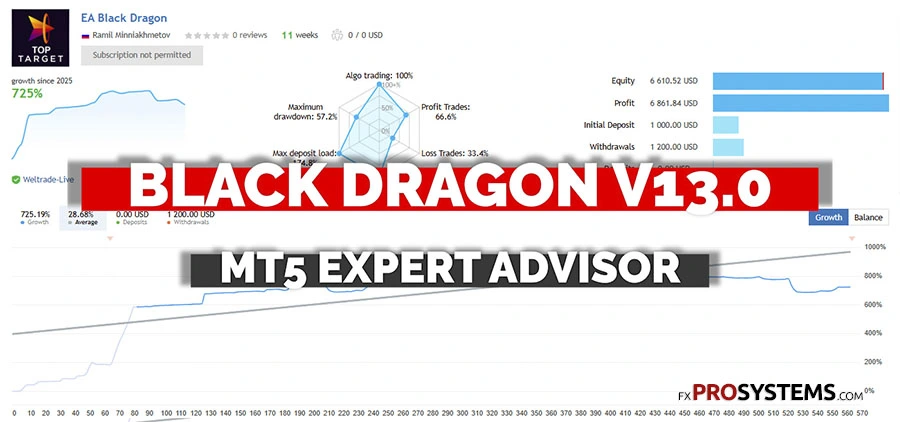
EA Black Dragon MT5 v13.0 Live signal
Parameters of the EA
First of all, you will need to add 2 URLs in the MT5 terminal settings, and the EA will inform you about this, (Tools > Options (or CTRL+O) > Expert Advisors > + add new URL):
https://sslecal2.investing.com/
https://www.worldtimeserver.com

One setting deserves special attention: Stop Loss is set to 0 (disabled) by default. This means individual trades have no hard loss limit unless you configure one yourself — and combined with the grid-based order system, this is exactly how an account can go from healthy to zeroed out with no warning. If you're using this EA, don't leave Stop Loss at its default value; set an explicit limit before running it on anything beyond a demo account.
In the EA settings, you can manage Stop Loss and Take Profit, adjust the order grid, true/false hedging, manage the EA's trading during the release of news of varying importance (High, Medium and Low), set trading using fixed and Auto lots, set up hourly trading, and more.
Preset files
The archive includes 17 preset configurations covering different pairs, timeframes, and risk profiles.
Gold (XAUUSD) — 9 presets total: 8 standard presets split by timeframe (M5, M15, H1) and by your broker's quote format (2-digit vs. 3-digit — check your broker's XAUUSD price display before picking one; loading the wrong digit-format preset will misconfigure your TP/SL distances), plus one more conservative M15 preset with a smaller lot size, a lower martingale multiplier, and an active trailing stop.
Forex majors — EURUSD (M15 with a fixed trading window, and M30), GBPUSD (H1), AUDCAD/NZDCAD (M15).
Crypto (BTC) — 3 presets: two standard (M15, and M30 tuned for Headway-broker execution), plus one conservative M5/M15 preset with a much smaller lot size, fewer simultaneous orders, and — like its Gold counterpart — an active trailing stop.
⚠️ Compatibility note: three files in the archive are named with an "mt4" prefix (EA_Black_Dragon_mt4_...). These are leftover MT4-format presets using a different parameter schema than this MT5 EA — they will not load correctly here. Stick to the files with "mt5" in the name.
⚠️ Stop Loss note — read this before loading any preset: 15 of the 17 presets ship with Stop Loss disabled (SL_=0). This isn't a one-off oversight — it's the developer's default approach across nearly every pair and timeframe. Combined with this EA's grid-based order system (up to 30 simultaneous orders on some presets), this is exactly the setup that can take an account to zero with no hard floor stopping it, as at least one reader has confirmed happened to them.
The two conservative presets (Gold M15 and BTC M5/M15) are a somewhat better starting point — smaller lot sizes, a lower martingale multiplier, and an active trailing stop that manages profit once a trade moves in your favor. But a trailing stop is not a substitute for a hard Stop Loss on your initial risk — it only engages after the trade is already profitable. Whichever preset you use, seriously consider setting an explicit SL value yourself before running this on a real account.
Conclusion
EA Black Dragon MT5 v13.0 is definitely a high-risk Expert Advisor, and I would not recommend it to beginners or traders who are not prepared to lose their initial deposit. And, of course, there is no question of using a real account – you need to start with tests and demo accounts. Based on this, you can then build up your trading using this EA. Since the robot requires a large initial deposit, I would recommend 5,000+ units, so it would be advisable to start with a cent account, such as ProCent.
Of course, if you need your advisor to work smoothly with a stable and reliable connection and minimal order execution delays, then you cannot do without a VPS.
For stable automated trading, I would recommend taking a look at the Gold Bundle
In the archive EA_Black_Dragon_v13_MT5.rar (348 Kb):
- EA Black Dragon MT5 v13.0.ex5
- Presets
Free Download EA Black Dragon v13.0 MT5